
01 / START HERE / YOUR FIRST ASCENT
Start your first Noillirk game
Open the homepage player and select Play today. Click or tap inside the answer field before typing. There are no multiple-choice options: read the category and prompt, then supply one response of your own. An everyday, widely recognized answer is usually a sensible starting point.
The practical first step in how to play Noillirk is learning the controls. Press Enter or the arrow beside the answer box to submit. On a phone, tap the field before typing; a keyboard action may also submit. Each Daily question allows 30 seconds, so read carefully without spending the whole clock searching for perfection.
- Read the actual category, not only the first few words of the question.
- Type a single clear answer rather than a list of alternatives.
- Use the submit arrow if your keyboard does not send the answer.
02 / START HERE / YOUR FIRST ASCENT
Accepted and rejected answers
Your first accepted answer ends that question. A response can fit the category yet sit below more familiar answers on the provider’s prepared board. Acceptance and popularity are separate: a valid answer need not be the top answer.
If you see Not on our list, the clock continues and you can try another response. Correct an obvious spelling error or choose a different example that clearly fits. Learning how to play Noillirk includes knowing when to change course; repeating the same rejected text spends time without testing a new possibility.
03 / START HERE / YOUR FIRST ASCENT
Read the reveal before pressing Next
After an accepted answer, the krill rises and a result shows your answer band, points and the board’s leading responses. Sky Climb waits for Next or Enter before moving on. Read the feedback at your own pace between questions; the next prompt’s clock is a separate step.
For a clearly labelled practice example, consider a European-capital prompt. The provider’s scoring guide uses Paris as its leading answer. This illustrates how to play Noillirk; it is not a claim about the questions in your Daily.
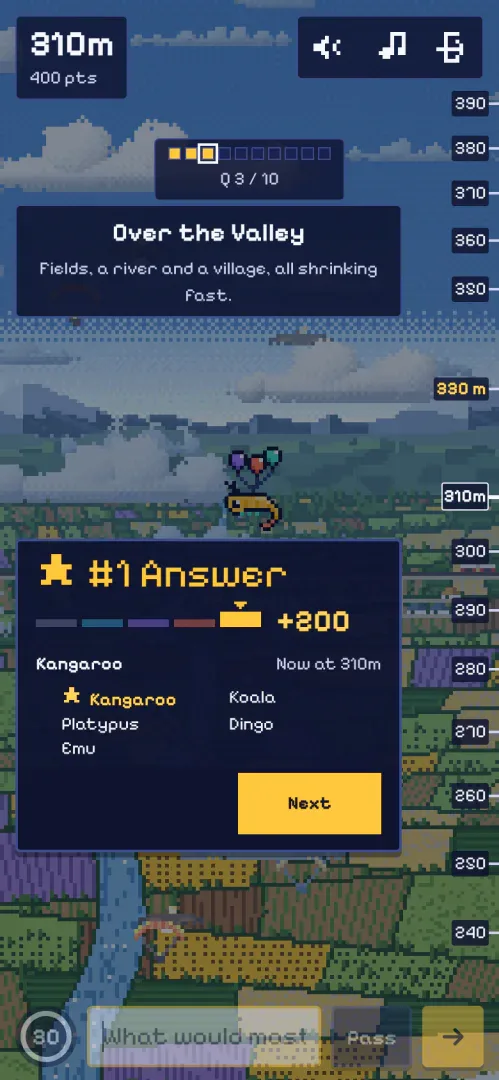
04 / START HERE / YOUR FIRST ASCENT
How the balloons and height work
Accepted answers earn one of five base scores, and later Daily questions apply larger multipliers. Points turn into altitude. A first-question number-one answer earns 100 points and reaches 30 metres; a perfect 2,500-point Daily reaches 14.0 kilometres. These examples do not imply a constant metres-per-point conversion.
Pass, an empty answer or a timeout earns nothing for that question. Your existing points and height stay. The three balloons are part of this stage’s presentation, rather than three lives you can lose. This distinction matters when learning how to play Noillirk from guides describing different editions.
05 / START HERE / YOUR FIRST ASCENT
Finish ten questions, then choose your next game
The final result brings together your points, altitude and question-by-question answers. Review where your familiar choices landed before starting more practice. This is the useful learning loop in how to play Noillirk: predict, compare with the board, then adjust your instinct.
Daily offers one shared set for a local date. For another run, follow Unlimited to the provider’s separate page. Reloading this embedded player reconnects the current Daily; it does not turn the window into an Unlimited game.
How to Play: questions & answers
How do I play Noillirk on a phone?
Open the player, tap the answer field and type one response. Submit with the arrow. If your browser limits the embedded window, use Open original game; device storage and keyboard behavior belong to that browser and provider.
How many questions do I need to finish?
Sky Climb Daily has ten prompts. When learning how to play Noillirk, focus on completing the full run and reviewing the results rather than expecting every answer to lead the board.
Does passing lower my existing score?
No. Pass gives zero for that prompt, while your previous points and height remain. You can then move to the next question.
Do I need an account to learn how to play Noillirk?
The provider allows the browser game without an app or sign-up. This website does not create an account for you or control the game’s saved progress.