
01 / MORE GAMES / VISUAL ASSOCIATIONS
Read the word before choosing pictures
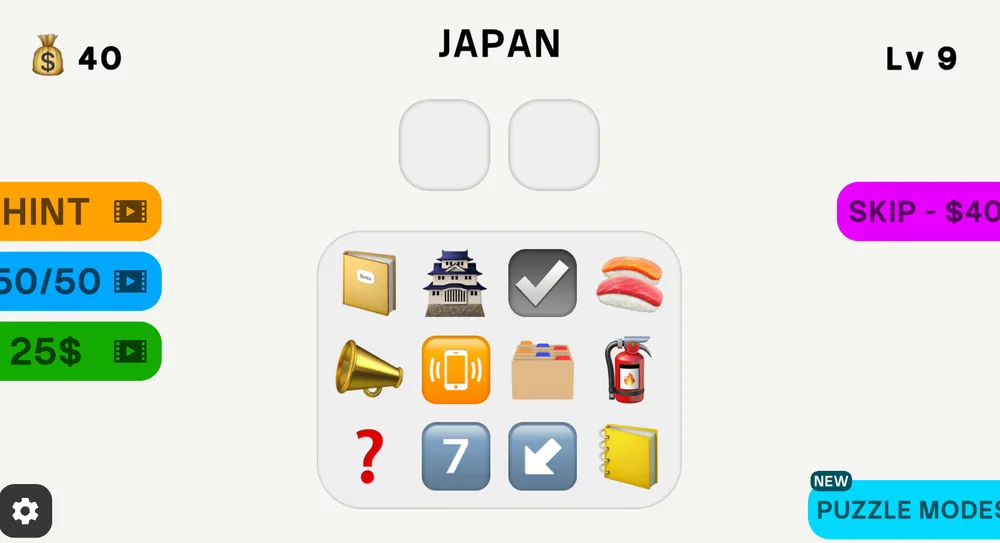
Start the game above and look for the target word. It might name a place, an object or an idea. Before touching the emoji choices, say the word’s ordinary meaning to yourself. This keeps a striking but irrelevant picture from deciding the answer for you.
Emoji Guess Master uses a two-image match. Each selected emoji should contribute to the same target, either literally or through an association. A picture can represent a component of a word, something linked to its meaning or a broader symbol.
02 / MORE GAMES / VISUAL ASSOCIATIONS
Choose two matching emojis
Click on desktop or tap on mobile to select a pair. Read the current game interface for how it checks or advances the selection; do not assume there is a confirmation button if none is displayed. The key requirement is the pair, not the spelling of a typed response.
Check the target again before committing to your second choice. One plausible emoji does not automatically make any nearby image a good partner. In Emoji Guess Master, compare what the two images say together with the word you were actually given.
03 / MORE GAMES / VISUAL ASSOCIATIONS
Think in components and associations
Here is an invented explanation, not a verified level answer: raincoat can suggest rain plus an item of clothing. This is a way of thinking about visual combinations, rather than a promise that the game contains those exact pictures or accepts that pair.
Start with literal components when they make sense. If they do not fit, consider a common symbol or cultural association. Compare several possible pairs before choosing one solely because it looks amusing. A useful match should explain the target, not simply connect the two pictures to each other.
- Understand the whole target before splitting it into smaller ideas.
- Ask what each emoji represents in this context, rather than only naming its appearance.
- Check whether both selections support the same interpretation.
04 / MORE GAMES / VISUAL ASSOCIATIONS
Common mistakes to avoid
Do not stop after finding one relevant emoji. Do not treat the pictures as a prompt for a keyboard answer either. The provider describes a given word followed by a two-emoji selection, which is different from many other games with similar names.
Avoid importing timing, hint prices or penalty rules from another emoji puzzle. The current interface is the source for those session controls. If you want to change a selection, use the options the game visibly provides rather than repeatedly reloading and risking progress.
05 / MORE GAMES / VISUAL ASSOCIATIONS
Words to pictures, or pictures to words?
Emoji Guess Master runs from a target word toward a picture pair. In 4 Clues 1 Word, several images point toward a word you construct from tiles. Both use associations, but they ask you to travel in opposite directions.
Noillirk adds a different goal: choosing an accepted response that ranks highly for estimated popularity. This puzzle instead looks for the designed visual match. Try it after a climb when you want a change in input while keeping familiar word meanings at the center.
| Game | Direction |
|---|---|
| Emoji Guess Master | Word → two emojis |
| 4 Clues 1 Word | Picture clues → one word |
| Noillirk | Prompt → a popular accepted response |
Emoji Guess Master: questions & answers
How do you play Emoji Guess Master?
Read the displayed target word and select two matching emojis from the choices. Follow the game’s own feedback to continue.
Do I choose one emoji or two?
Two. The pair should express or associate with the target word, rather than merely look related to each other.
Do I type a word answer?
The described core interaction is selecting emoji pictures for a word that is already supplied. It is not the letter-tile input used in 4 Clues 1 Word.
Can I use touch controls?
Yes. The provider describes tapping the interface on phones and clicking it on desktop. Browser and provider loading conditions still affect the embedded player.